
This article explains:
- What a Primary and Secondary user is
- How to check if you’re a Primary user
- How to check which email you’re signed in with
- What to do if you’re not the Primary user
Primary users
The first person to connect a tepeo ZEB to their account automatically becomes the Primary user and has full control over settings. Anyone who connects to the same ZEB afterwards is a Secondary user with view-only access. Your access level determines which settings you can change in the tepeo app.
As a Primary user you:
- Have the highest level of control for that ZEB.
- Can change key settings in the app, including:
- ZEB charging style
- Away Mode
- Can be signed in on multiple devices at the same time.
Secondary users
Once a Primary user has connected to a ZEB, any additional users who connect to the same ZEB are automatically set as Secondary users.
- There’s no limit to how many Secondary users a ZEB can have.
- Secondary users have view‑only access to all areas of the tepeo app
- Secondary users cannot change any of these settings.
-
- Charging settings
- Boost charging via the app
- Tariff settings
- Away Mode
- Flow temperature controls
- Network settings
- Not visible to Secondary users
- Charging settings
How to check if you are the Primary user
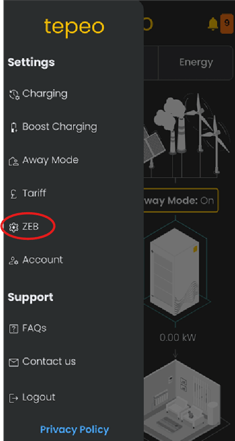
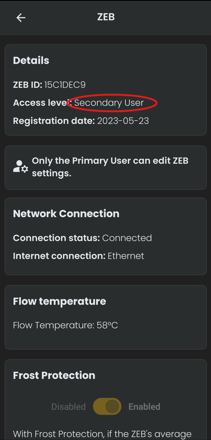
- Open the tepeo app on your phone or tablet.
- Select ‘ZEB Settings’ from the tepeo App menu
- Look for “Access Level” in the Details section.
- You should see either Primary User or Secondary User
How to check which email you’re signed in with
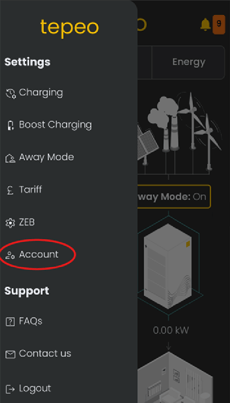
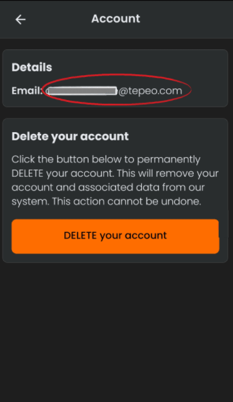
- Open the tepeo app on your phone or tablet.
- Select ‘Account’ from the tepeo app menu.
- Look for “Email” in the Details section
To switch to the right email:
- Logout from the tepeo app menu.
- Log back in using the email address that:
- You used when you first registered with tepeo, or
- Receives tepeo emails about your ZEB.
If you’re not sure which email that is, please contact tepeo Support and we’ll help you confirm the correct account.