---
title: Welcome to your home’s tepeo heat battery boiler
description: Learn how to use your tepeo heat battery boiler (ZEB) to keep your home warm and efficient. This guide covers how the ZEB works, tips for optimizing your heating schedule, choosing the right energy tariff, and getting set up for success.
---
[Skip to content](https://helpcentre.tepeo.com/welcome-guide#main-content)
[](https://www.tepeo.com/)
- [Help Centre](https://helpcentre.tepeo.com/)
- [tepeo.com](https://www.tepeo.com/)
Open main navigation
Close main navigation
- [Help Centre](https://helpcentre.tepeo.com/)
- [tepeo.com](https://www.tepeo.com/)
- [Contact us](https://www.tepeo.com/contact-us/)
[Contact us](https://www.tepeo.com/contact-us/)
Hello. How can we help you?
- There are no suggestions because the search field is empty.
1. [Help Centre](https://helpcentre.tepeo.com/?hsLang=en)
2. [Documents](https://helpcentre.tepeo.com/documents?hsLang=en)
September 16, 2026
# Welcome to your home’s tepeo heat battery boiler
## If you have not come across a tepeo heat battery boiler (also known as a ZEB) before, do not worry. It is designed to do something very familiar, keep your home warm and provide hot water, but it does it in a smarter, lower-carbon way than a traditional gas or oil boiler. This guide explains what it is, how it works, what to expect, and how to get the best from it day to day.
[Download PDF](https://helpcentre.tepeo.com/hubfs/Welcome%20to%20your%20home%E2%80%99s%20tepeo%20heat%20battery%20boiler.pdf?hsLang=en) [Contact us](https://www.tepeo.com/contact-us/)
### **Jump to:**
1. **[How to use day to day](https://helpcentre.tepeo.com/welcome-guide#how-to-use-it-day-to-day)**
2. **[Getting set up in your first 7 days](https://helpcentre.tepeo.com/welcome-guide#getting-set-up-in-your-first-7-days)**
3. [**Optimising your heating system**](https://helpcentre.tepeo.com/welcome-guide#optimising-your-heating-system)
4. **[When and how to get help](https://helpcentre.tepeo.com/welcome-guide#when-to-get-help)**
### **What is a heat battery boiler?**
It’s an electric heating system that stores heat in advance and then uses that stored heat to provide space heating and hot water for the home.
Unlike a gas or oil boiler, it does not burn fossil fuel in the property. Instead, it uses electricity to charge up, stores that energy as heat, and then releases it when the home asks for space heating or hot water.
In simple terms, it works like this:
- Charges using electricity, often when electricity is cheaper and greener
- Stores that energy as heat
- Uses that stored heat to warm your radiators and hot water system
### **How is it different from a normal boiler?**
A traditional boiler usually heats water immediately when there is a demand for heat.
A ZEB works differently:
- It stores energy as heat first
- It releases that heat later when the home asks for space heating or hot water
- It operates as a heat-only boiler: The ZEB heats water for your radiators and works alongside a separate hot water cylinder (or heat store) rather than providing instant hot water.
That is why you may hear it described as both a boiler and an energy storage system.
### **Energy tariffs and why they matter**
💡 **Pro Tip:** Choosing a Time-of-Use (TOU) tariff is the single biggest factor in reducing your heating costs. Ensure your tariff supports off-peak rates.
A ZEB stores electricity as heat, so the tariff can make a real difference.
The system is particularly well suited to tariffs where electricity prices vary by time, because it may be able to make better use of cheaper periods.
In general, a good tariff for this kind of system is one that:
- Offers lower-cost electricity at certain times of day
- Works well with planned charging behaviour
- Rewards flexible electricity use
The key point is simple: the ZEB can often perform best when paired with a tariff that supports Smart Charging and off-peak use.
### **How to use it day to day**
You control comfort and temperature levels through the home’s normal heating controls, such as:
- Room thermostats
- Heating schedules
- Hot water schedules, where applicable
The ZEB then manages stored heat in the background through one of four charging styles: Smart Charging, Basic Charging, Custom Charging, and Boost Charge.
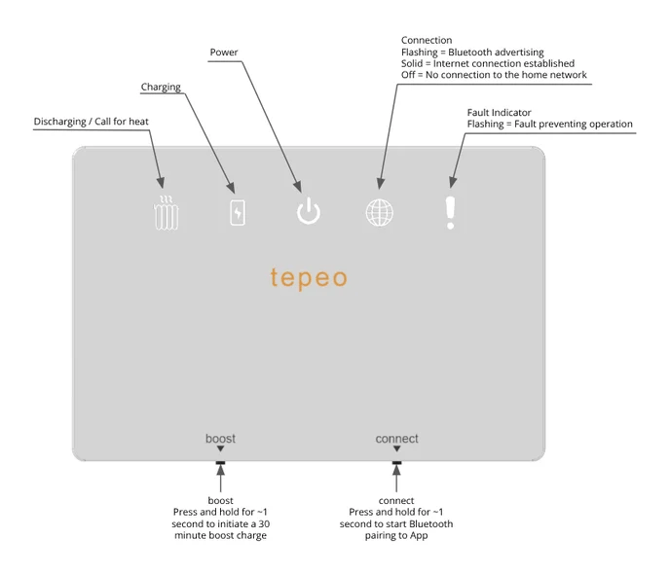
For those moments when you want a direct, physical interface with the ZEB, you can use the Comms Box. It sits between the ZEB and the heating controls to provide a simple, at-a-glance status by using lights to show if it is charging, discharging, or if there is a connection issue. It also features a physical Boost button to manually activate a 30-minute Boost Charge directly from the unit, which is particularly useful if you do not have access to the tepeo app.
### **Understanding the different charging styles**
One of the biggest differences between a ZEB and a gas boiler is how it charges. There are four charging styles: Smart Charging, Basic Charging, Custom Charging, and Boost Charge.
💡 **Pro Tip:** We recommend using Smart Charging as your default setting. It is designed to automatically balance your heating needs with your electricity tariff, helping to optimise both comfort and running costs.
#### **1. Smart Charging**
This is where your ZEB decides when to charge and for how long.
To do that, the smart algorithm uses:
- Tariff details
- Historic usage
- Weather forecast
- Next day heat demand prediction
You can also choose what you want the system to optimise for:
- **Cost:** charges at the cheapest available times. Depending on your tariff, this may sometimes mean using electricity generated from fossil fuels.
- **Carbon:** charges at the greenest times, when grid carbon intensity is lowest. This can sometimes happen during more expensive periods and may increase your energy bills.
By default, the ZEB is set to Smart Charging optimised for lowest cost. This can be changed in Charging Settings.
#### **2. Basic Charging**
Basic Charging is similar to Smart Charging, but it adds a simple minimum charge rule to help make sure there is enough stored heat available.
As well as charging for your predicted heating needs, the ZEB will make sure it charges:
- To 100% on colder days, when the average outside temperature is predicted to be below 15°C
- To at least 50% when the temperature is expected to be above 15°C
This is a useful setting while the system is learning, and you can return to Basic Charging at any time.
#### **3. Custom Charging**
With Custom Charging, you decide when and how much you want your ZEB to charge.
If you choose this option, you should manually set the ZEB to charge during the off-peak hours of your electricity tariff, with top-up charging during peak times if needed.
The ZEB will then aim to maintain your chosen Target Charge percentage, regardless of the tariff selected in the tepeo app.
#### **4. Boost Charge**
Boost Charge is a standard feature and is designed for a rapid top-up when extra stored heat is needed.
A good way to think about Boost Charge is:
- It is useful when more heat is needed sooner than expected
- It can help recover comfort more quickly
- It is best treated as a helpful top-up feature rather than the normal everyday way to run the system
- It charges the ZEB for 30 minutes
- It will help train your Smart Charging algorithm
### **Getting set up in your first 7 days**
Your first week with a ZEB is about getting connected, choosing the right settings, and giving the system time to learn.
#### **Step 1: Your first day with your ZEB**
On day one, focus on getting everything set up properly.
- Download the tepeo App and register your account
- Link the ZEB to your account and connect it to the Wi-Fi
- Select your tariff so the ZEB knows your off-peak hours and can schedule charging at the right time
💡 **Pro Tip:** Moving in before your home Wi-Fi is active? You can temporarily pair your ZEB to a mobile phone Wi-Fi hotspot during initial setup. Once your permanent home broadband is installed, simply update the Wi-Fi credentials in the tepeo App. (If no mobile hotspot is available, you can still trigger a 30-minute top-up using the physical Boost button on the Comms Box).
#### **Step 2: Do you need heating right now?**
If you are moving in during the warmer months and do not require central heating right away, you will want to avoid unnecessarily charging.
- Set your room thermostat low: Ensure your thermostat is set down (e.g., 15°C or lower) so it does not trigger calls for space heating.
- Enable 'Away Mode' in the App: Away Mode allows you to temporarily pause all automatic charging, including Smart, Basic and Custom Charging, either indefinitely or until a pre‑selected return date. This is ideal if you’re going on holiday or won’t need your ZEB for heating and/or hot water for an extended period, such as during the summer months.
- When autumn arrives: Simply toggle Away Mode off in the app, set your thermostat back to your preferred living temperature (18–21°C), and switch to Basic Charging for 3–4 days.
If you need space heating immediately, follow this 7-day routine:
##### **Days 1–4: Enable Basic Charging for a few days so the ZEB can learn**
For the next few days, enable Basic Charging so the system can learn your heating demands.
During this period, the ZEB will charge:
- 100% if the average temperature is below 15°C
- 50% if the average temperature is above 15°C
This gives the system a simple starting point while it learns how your home uses heat. You can also return to Basic Charging at any time if needed.
##### **Days 5–6: Enable Smart Charging**
Once the ZEB has had time to learn your habits, enable Smart Charging so it can begin updating its charging schedule each day based on:
- Your previous heating usage
- The next day’s weather forecast
- Your selected tariff
Your daily bills may be slightly higher while the system is learning, but this should normally settle by the end of the first week.
If your routine is less predictable, you can choose Custom Charging instead. This allows you to control the charging time and charge percentage based on your home heating needs and lifestyle.
##### **Day 7 and beyond: Heat your home and not the planet**
From this point on, the system should be better tuned to the home and your routine.
If you ever need a little more stored heat, you can use Boost Charge through the app or the Comms Box. This charges the ZEB for 30 minutes.
A few reminders for the first week
- Download the app and complete setup as early as possible
- Make sure the ZEB is connected to Wi-Fi if app access is available
- Choose the correct tariff so off-peak charging works properly
- Give the system time to learn before making too many changes
- Use the optimisation tips in this guide to help improve comfort and running costs
### **Good day-to-day habits**
- Keep your heating schedule aligned with when you are home
- Avoid making lots of large temperature changes in a short time
- Give the system a little time to respond if you have changed a setting
- Learn how your home warms up over a few days
- Check the app to understand charge behaviour and system status
### **Optimising your heating system**
💡 **Pro Tip:** Keep your heating schedule consistent with your daily routine to give the system time to learn your habits.
Once you are comfortable with the basics, these simple habits can help improve comfort and reduce running costs.
#### **Optimise your heating schedule**
A good starting point is to set your thermostat to:
- 18–21°C when you are at home
- Around 15°C when you are away or asleep
Even a 1-degree reduction can make a noticeable difference to running costs.
#### **Allow uninterrupted charging**
Try to avoid turning your heating on during off-peak charging hours, as this can interrupt the charging period and stop the system from fully charging.
As a general guide, a full charge takes around 4.5 hours.
If you need advice on charging during extremely cold nights or across longer off-peak periods, visit the tepeo Help Centre at helpcentre.tepeo.com.
#### **Reduce standing losses**
To make the most of the stored heat, try to minimise the amount of time the system is holding heat without using it. A simple way to do that is to programme your heating to come on soon after charging.
#### **Running costs: what affects them?**
Running costs can depend on:
- The electricity tariff
- Your heating schedule
- Outdoor temperature
- How and when the system charges
The system is designed to support energy savings by storing electricity when it is most advantageous, but actual costs will vary by property and tariff.
### **Practical safety and access basics**
💡 **Pro Tip:** Treat the area around your ZEB as 'service access' — avoid storing items directly against it to ensure proper airflow.
If the unit is in a cupboard or utility area, treat the space around it as service access space rather than storage space.
Useful rules to follow:
- Do not block vents or airflow around the unit
- Do not store flammable or combustible items against it
- Do not cover or obstruct the front of the appliance
- If something looks unusual, report it rather than trying to fix it yourself
### **Quick guide at a glance**
- Use the home’s normal heating and hot water controls
- Let the system follow its schedule where possible
- Avoid making repeated large temperature changes
- Keep ventilation and access around the unit clear
- Do not block, cover, or store items against the appliance
- Expect the system to work a little differently from a gas boiler, especially at first
- Remember that the tariff can make a real difference to performance and running costs
### **When and how to get help**
We’re here to help if you have questions or need assistance with your ZEB. Whether you’re unsure about a setting, need clarification on how the system is operating, or have a more urgent issue, please don't hesitate to reach out.
#### **Support Hours**
Our team is available to support you Monday to Friday, 9:00 AM – 5:00 PM. You can reach us by phone at 020 7072 5540 or via email at [customer.service@tepeo.com](mailto:customer.service@tepeo.com).
#### **Weekend & Winter Support**
Throughout the winter period, while our phone lines are closed at weekends, our [customer.service@tepeo.com](mailto:customer.service@tepeo.com) inbox is monitored regularly between 9:00am and 2:00pm:
- Urgent issues (e.g., no heating or hot water) are prioritised, with an aim to respond within 4 hours.
- Non-urgent enquiries will be responded to within 2 working days, or once normal operations resume.
#### **Quick Answers**
You can find answers to many common questions in our [Help Centre.](https://helpcentre.tepeo.com/?hsLang=en)
#### **When to contact us**
Please get in touch if:
- Your home is not heating as expected
- Hot water behaviour is unclear
- You see a warning or fault
- You are unsure which settings should be used
- The app is unavailable and you do not know how the system is operating
### **Final reassurance**
A ZEB may be new to you, but day to day it is there to do something very familiar: keep your home comfortable and provide dependable heating in a cleaner, smarter way.
Once you understand the basics, most of the benefit comes from letting the system operate as intended: using consistent heating schedules, keeping airflow around the unit clear, pairing the ZEB with a Time-of-Use tariff, and reaching out to the tepeo team if something does not seem right.
- [Product Information](https://helpcentre.tepeo.com/product-information?hsLang=en#main-content)
- [Product Overview](https://helpcentre.tepeo.com/product-information?hsLang=en#product-overview)
- [Technical Specifications](https://helpcentre.tepeo.com/product-information?hsLang=en#technical-specifications)
- [Cost and Carbon](https://helpcentre.tepeo.com/product-information?hsLang=en#cost-and-carbon)
- [Energy Tariffs](https://helpcentre.tepeo.com/product-information?hsLang=en#energy-tariffs)
- [Maintenance and Care](https://helpcentre.tepeo.com/product-information?hsLang=en#maintenance-and-care)
- [Installation](https://helpcentre.tepeo.com/installation?hsLang=en#main-content)
- [Where should I put my ZEB?](https://helpcentre.tepeo.com/installation?hsLang=en#where-should-i-put-my-zeb)
- [Electrical and plumbing requirements](https://helpcentre.tepeo.com/installation?hsLang=en#electrical-and-plumbing-requirements)
- [User Support](https://helpcentre.tepeo.com/user-support?hsLang=en#main-content)
- [The ZEB](https://helpcentre.tepeo.com/user-support?hsLang=en#the-zeb)
- [Tariffs](https://helpcentre.tepeo.com/user-support?hsLang=en#tariffs)
- [Comms Box](https://helpcentre.tepeo.com/user-support?hsLang=en#comms-box)
- [Automated Charging styles (Smart, Basic, Custom)](https://helpcentre.tepeo.com/user-support?hsLang=en#automated-charging-styles-smart-basic-custom)
- [Boost Charge](https://helpcentre.tepeo.com/user-support?hsLang=en#boost-charge)
- [Away Mode](https://helpcentre.tepeo.com/user-support?hsLang=en#away-mode)
- [ZEB Connectivity](https://helpcentre.tepeo.com/user-support?hsLang=en#zeb-connectivity)
- [User & account Management](https://helpcentre.tepeo.com/user-support?hsLang=en#user-account-management)
- [App Insights](https://helpcentre.tepeo.com/user-support?hsLang=en#app-insights)
- [tepeo Care Plan and ZEB Health Check](https://helpcentre.tepeo.com/user-support?hsLang=en#tepeo-care-plan-and-zeb-health-check)
- [General/Miscellaneous](https://helpcentre.tepeo.com/user-support?hsLang=en#general-miscellaneous)
- [Troubleshooting and common ZEB problems](https://helpcentre.tepeo.com/user-support?hsLang=en#troubleshooting-and-common-zeb-problems)
- [Documents](https://helpcentre.tepeo.com/documents?hsLang=en)
[](https://www.tepeo.com/)
### Heat your home, not the planet
tepeo Ltd, 630 Wharfedale Road, Winnersh, Wokingham, RG41 5TP